

Introduction
Did you find the “Crawled – currently not indexed” error in your Google Search Console? You publish a new article, but nobody visits. This is a common and frustrating problem for website owners.
It means Google found your page. Google’s bots visited the page and read every word. But they decided not to put it in Google Search results.
Your page is in their database, but not in the index.
This guide explains why this happens. It shows you exactly how to fix it. We will focus on simple steps that work.
Part 1: Defining the Crawled – Currently Not Indexed Status
We need to define the problem before we fix it.
“This status is specific. It is not the same as ‘Discovered – currently not indexed.’ You need to understand the difference. The Crawled – currently not indexed status confirms that Googlebot actually visited your site.”
“Discovered” means Google knows the URL exists but has not visited yet. The queue was full, or the site was slow. Google will likely come back later.
“Crawled” is worse. It means Google did visit.
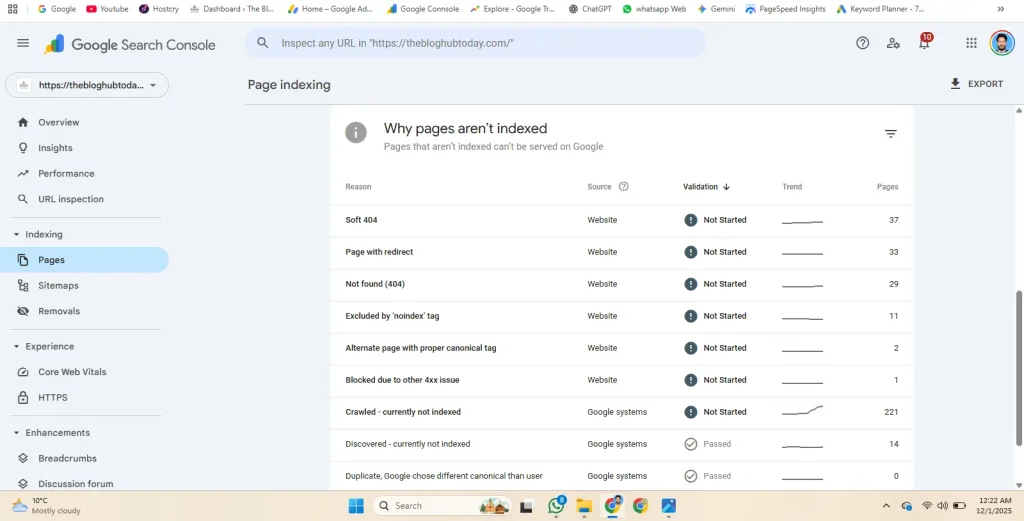
Googlebot looked at your content. It analyzed your text and images. After that review, Google decided the page was not worth showing to users.
Think of it like a job interview.
- Discovered: You submitted your resume, but they haven’t called you yet.
- Crawled: You had the interview, but they didn’t hire you.
Google is telling you the quality is not high enough yet. It does not see unique value compared to other pages on the internet.
This sounds harsh, but it is good news. It means you can fix the page to change Google’s mind
Causes of the Crawled – Currently Not Indexed Error
“Why does the Crawled – currently not indexed report appear in your console? Usually, it is because Google is saving resources.”
Google does not hate your website. It is just being efficient.
Storing billions of web pages costs money. Google has to pay for servers and electricity. It only wants to save pages that offer something new or helpful. If your page does not add value, Google saves money by ignoring it.
Here are the three most common reasons this happens.
1. The “Thin Content” Problem
This is the number one cause for new bloggers. “Thin content” does not just mean a short article. It means the article lacks depth.
Ask yourself these honest questions about the unindexed page:
- Is the article shorter than 500 words?
- Does it state obvious facts that everyone knows?
- Did you repeat the same points over and over?
If the answer is yes, Google sees it as low quality. It assumes the user can find this information on a better website.
To fix thin content effectively, you need to follow proper On-Page SEO techniques to structure your headings and keywords.
2. The Duplicate Content Trap
Google wants to show unique results. It does not want to show five pages that say the exact same thing.
Duplicate content happens in two ways:
- External Duplication: You copied text from another website. Google knows the other site published it first. It will index them, not you.
- Internal Duplication: You have similar pages on your own site. For example, you might have a page for “Blue Shoes” and another for “Blue Running Shoes.” If the text is 90% the same, Google will only keep one.
3. 🔗Poor Internal Linking (Orphan Pages)
Google uses links to understand your site. It follows links from your home page to find other articles.
An “Orphan Page” is a page with no internal links pointing to it.
- If you don’t link to the new article, Google thinks it is not important.
- If you don’t care about the page, Google won’t care either.
4. False Positives (RSS and Tag Pages)
Sometimes, you see this error for URLs that should not be indexed.
- Feed URLs: URLs ending in
/feedare for RSS readers, not search results. - Tag Pages: WordPress creates pages for every tag you use. These are often low quality.
⚙️Part 3: How to Fix Crawled – Currently Not Indexed Errors
Now we know the problem. The page is not “good enough” for Google yet. We must upgrade it.
Do not just use the “Request Indexing” button immediately. If you do not change anything, Google will just reject the page again. You must improve the page first.
Here are the safe, proven methods to fix this.
Method 1: The “Content Injection” Technique
Google wants helpful content. If your page is thin, you need to add “weight.”
You do not need to write a book. You just need to add something unique. This proves to Google that you are an expert (the “E” in E-E-A-T).
Try adding one of these elements to your unindexed page:
- Add a Comparison Table: Google loves data. If you are writing about “Best Free AI Tools,” do not just list them. Create a simple table comparing their features, price, and limits.
- Add a “Personal Experience” Section: Write a paragraph starting with “In my experience…” or “I tested this by…” This shows you are a real person, not a robot copying text.
- Answer “People Also Ask” Questions: Go to Google Search. Type in your topic. Look at the “People Also Ask” box. Add a FAQ section to the bottom of your article that answers 2 or 3 of these questions directly.
Why this works: It makes your page different from the thousands of other pages on the same topic.
“Adding this extra value is often the fastest way to resolve the Crawled – currently not indexed error for new blog posts.”
🔗Method 2: The Internal Link Boost
Think of links as “votes.” When Page A links to Page B, it tells Google, “Page B is important.”
If your new article has zero links from your own site, you are telling Google it is not important.
Follow these steps:
- Find your “Power Pages”: Go to your site. Find 2 or 3 older articles that are already indexed and get traffic.
- Edit the Old Articles: Find a spot in the text where you can mention the new topic.
- Add the Link: Link from the old, strong article to the new, unindexed article.
- Use Descriptive Text: Do not just use “click here.” Use text that describes the topic, like “read our guide on fixing SEO errors.”
Why this works: This passes “authority” from your good pages to your struggling page. It forces Google bots to crawl the new page again when they visit the old page.
Method 3: Check Your Technical Settings
Sometimes, you might have accidentally told Google to stay away. This is rare, but it happens.
Check these settings on your page:
- The “Noindex” Tag: Look at the source code of your page. Search for the word “noindex.” If you see it, you are blocking Google. Remove it immediately.
- The Canonical Tag: This is a bit technical. Every page should point to itself as the “original.” If your page points to a different URL as the canonical version, Google will ignore your page. Ensure the canonical link matches the URL of the page you are on.
Part 4: Verifying the Crawled – Currently Not Indexed Fix
You have updated the content. You have added internal links. Now, you need to tell Google to look again.
Follow this exact process to speed up the results.
- Open Google Search Console.
- Paste the URL of your fixed article into the search bar at the top.
- Wait for the data to load. It will still say “URL is not on Google.”
- Click “Test Live URL.” This button is in the top right corner. It tests the page right now.
- Check the Result. If it says “URL is available to Google,” you are safe.
- Click “Request Indexin
Important Warning: Only click this button once. Clicking it ten times does not make Google work faster. It might actually flag you as spam.
Part 5: FAQs About Crawled – Currently Not Indexed
Here are answers to common questions about indexing errors.
How long does it take for Google to re-crawl my page?
There is no set time. It usually takes between 4 days and 4 weeks. Newer sites take longer. Older, trusted sites get crawled faster. Be patient. Do not change the page again while you wait.
📲Does sharing on social media help?
Yes, it can help. Sharing your link on X (Twitter), LinkedIn, or Facebook creates “social signals.” This brings real traffic to the page. When Google sees users visiting the page, it often decides to index it faster.
Should I just delete the page and start over?
No. Deleting the page usually does not fix the root cause. If you write a new page with the same weak content, Google will ignore the new one too. It is always better to improve the existing page than to delete it.
Is “Crawled – Not Indexed” the same as a penalty?
No. A penalty is a manual action against your site for breaking rules. This error is just an algorithmic decision. Google is simply saying, “This specific page is not a priority right now.” You are not in trouble. You just need to improve quality.
Conclusion: Quality Wins in the End
Getting this error is painful. It feels like your hard work was wasted.
But remember, this is Google’s quality filter. It keeps the search results clean.
If you treat this error as feedback, your site will grow stronger. It tells you when your content is too thin. This warning forces you to write better answers. You are also reminded to build internal links.
Focus on serving the reader first. If real humans love your article, Google will eventually love it too.
Go through your site today. Find those unindexed pages. Add a table, a personal story, or a better description. Turn those rejected pages into your best content. This is how you finally fix the Crawled – currently not indexed error.