

You did all the work. You wrote great articles. Still, your website rankings are stuck. They simply do not move up. Yet, this is a common and frustrating problem. The issue is likely small, technical errors. We fixed this with a simple SEO audit checklist. This quick 60-minute process fixes hidden issues. Also, this checklist is a fast way to restart your site’s growth. We will check five key areas. Fixing these problems will help your strong articles finally rank higher.
Step 1: Site Speed and Mobile Audit Check
Speed and mobile usability are critical. A slow site makes users leave fast. Google sees this action, so it lowers your rank. Fast sites show Google you care about the visitor.
A. Run a Speed Test
Use a free tool, like PageSpeed Insights. This tool gives you two scores. You get one score for desktop and one for mobile. Focus on the mobile score first, because it is more important now. Look for items marked as “red.”

B. Ensure Mobile Friendliness
Your site must look perfect on a phone. Open your site on your phone to check it yourself. Are the buttons easy to press? Is the text easy to read? If it is hard to use on a phone, fix it now.
C. Action: Fix These Issues
The most common speed issue is large images. Use an image compressor to make files smaller. Ask your web host if your server response time is slow. Fix all red issues before moving to Step 2.
Step 2: Technical Site Audit: Search Console Fixes
You must use Google Search Console for this step. This is a critical part of any Simple SEO Audit Checklist. Look at the Coverage report first. This report shows you which pages Google is reading. For example, you will see colored bars for different page statuses. Focus on the red bar labeled ‘Error’. Errors mean Google cannot access the page.
A. Check the Coverage Report
Look at the Coverage report first. This report shows you which pages Google is reading. You will see colored bars for different page statuses. Focus on the red bar labeled ‘Error’ and the gray bar labeled ‘Excluded’. Errors mean Google cannot access the page. Excluded means Google chose not to index it. You must fix all errors right away.
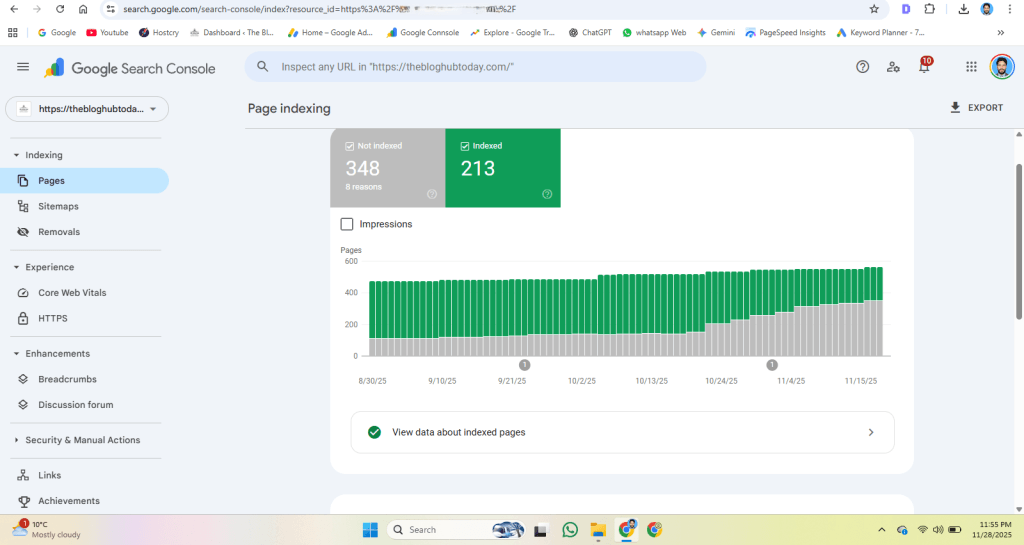
B. Review Indexing Issues
If a page is excluded, Google might think it is low quality. Or it could be a duplicate page. Look closely at the reason for exclusion. For example, if a main article is excluded, you need to check its quality. If a tag or category page is excluded, this is often fine.
C. Action: Handle Fixes
Fix critical errors first, like a broken server or a missing page. Use the URL Inspection Tool to check your fixed page. When ready, click ‘Validate Fix’ in Search Console. This asks Google to look again at your site. Fixing these issues proves to Google that your site is professional.
Step 3: Deep Clean On-Page Content
On-Page SEO is about what is actually on your page. Google reads every element. Make sure every article is optimized for the reader and the search engine.
A. Audit Title Tags and Descriptions
Look at all your article titles and meta descriptions. A title tag that is too long gets cut off in search results. A very short one wastes space. Every page must have a unique meta description. This text needs to convince people to click on your link.
B. Strengthen Internal Links
Use your existing content to build strength. When you talk about a topic, link to your other relevant articles. If this article mentions Title Tags, link to your On-Page SEO article. If it mentions authority, link to your Off-Page SEO article. This tells Google your site has a deep network of information.
C. Optimize Images and Headings
Make sure all your images load fast. They need small file sizes. Every image must have Alt text. This is a brief description of the image. Also, use H2 and H3 headings to break up long text. This makes reading easier for people. When auditing your content, make sure you understand the core concepts covered in our detailed guide on On-Page SEO.
Step 4: Review Content Gap and Quality
Google wants sites that fully cover a topic. Thus, they do not want shallow answers. You need to see if your articles are complete. This step of the Simple SEO Audit Checklist ensures your articles are complete.
A. Find Content Gaps
Look at what top-ranking sites cover that you did not. Write down these missing topics. Then, you can add them to your existing articles or write new ones later. This process ensures your site is a complete resource.
B. Improve Low-Quality Pages
Find articles that get very little traffic. These might be low quality in Google’s eyes. You should update these pages. Add new details, more text, and current information. Make the content more useful. If the article is not worth saving, you can simply delete it.
C. Check for Spammy Links
Look for bad links pointing to your website. These are called spam or toxic links. For dealing with spam or toxic links pointing to your site, refer to our complete article on Off-Page SEO strategies.
Step 5: Final Check and Re-Submit
You are now ready to finish the audit. After you fix all the errors, you need to tell Google. This final step of your Simple SEO Audit Checklist is very important. Re-submit your sitemap.
A. Update and Submit Sitemaps
After you fix all the errors, you need to tell Google. Go back to Google Search Console. Re-submit your sitemap. This tells Google to quickly re-crawl your whole site. It is like turning in your final, corrected work.
B. Test Every Link
Before you finish, click every single link on your site. Make sure no links are broken. Check every button and menu item. A clean site is a trustworthy site.
C. Final Conclusion
SEO is not a one-time fix. It is a continuous process. Doing this quick audit every month will keep your site rankings high. Now you are ready to apply for AdSense with a very clean, professional site.
wrap-up:Conclusion✨
SEO is not a one-time thing. It is a continuing job. You just completed a full, fast audit. The technical roadblocks are now fixed. You also cleaned up your most important pages. Your site is now faster, cleaner, and more trustworthy. This proves your professionalism to Google. Doing this simple audit every month will keep your site rankings high. Now you are ready to apply for AdSense with a very clean, high-value website. Keep publishing your great articles and checking your site.
Frequently Asked Questions (FAQs)
How many articles do I need for AdSense approval?
You need enough content to prove your Expertise. Aim for 15 to 20 high-quality, long articles. Each post should be well over 1,000 words.
How long does AdSense approval take?
Approval can take anywhere from 2 days to 4 weeks. It depends on how fast Google reviews your site. Be patient. Do not re-apply until the first review is finished.
Do I need a Privacy Policy page?
Yes, absolutely. You must have a Privacy Policy, an About Us page, and a Contact Us page. These pages build trust and are required by AdSense policy.
Should I use a free domain for AdSense?
No. You must use a custom domain name like yourwebsite.com. Free subdomains often get rejected. This looks more professional.
Can I use AI to write my content?
Google allows AI use. However, your content must show originality and expertise. You must edit and add your own unique insights to the AI text.