

Introduction
Every blogger wants their posts to rank high on Google. Therefore, Yoast SEO is a great tool to help you succeed. It checks your writing and gives you a color score. For example, a green light means your post is ready to publish. On the other hand, a red light means you need to make some changes. Unfortunately, many new writers find these red lights very frustrating.
You might write a great post but still see errors. Specifically, the plugin checks for things like sentence length and keywords. As a result, it can feel like a strict teacher grading your work. However, do not let these technical details stop you from writing. Fortunately, you can fix these errors easily with a few tricks.
This guide explains how to satisfy the Yoast SEO plugin. First, we will break down the most common problems one by one. Next, you will learn how to write clearer sentences for your readers. Finally, we will show you how to use keywords naturally. Follow this simple advice to turn your bullets green today.
Fixing Passive Voice in Yoast SEO
What is Passive Voice? First, passive voice happens when the subject of your sentence receives the action. Consequently, it makes your writing feel slow and weak. The subject does not act; instead, it is acted upon. For instance, this sentence structure often uses helper verbs like “was” or “were.” Therefore, it forces the reader to wait to find out who did the work.
Why Yoast SEO Dislikes It Yoast SEO flags passive voice because it is harder to read. In general, online readers want quick and direct information. However, passive sentences create extra mental work for your audience. In addition, they make your sentences longer than they need to be. As a result, search engines prefer content that is easy to understand. Clear writing keeps people on your page longer.
How to Identify It To start, look for sentences that end with “by someone.” For example: “The book was written by me.” The focus is on the book, not the writer. Clearly, this is passive. You want to focus on the person doing the action.
Simple Fixes To fix this, flip the sentence around. Next, put the “doer” at the start of the sentence. Then, make them perform the action directly.
- Passive: The blog post was published by the editor.
- Active: The editor published the blog post.
- Passive: The error was fixed by the plugin.
- Active: The plugin fixed the error.
The 10 Percent Rule Admittedly, you do not need to remove every passive sentence. Sometimes, passive voice is necessary. However, Yoast SEO allows you to use it in 10 percent of your sentences. Therefore, try to stay below this limit for a green light. Also, read your text aloud to find awkward phrasing. If a sentence sounds flat, try to make it active.
Shortening Your Sentences
The Problem with Length Generally, long sentences are difficult to read online. This is because they demand too much focus from your audience. Often, readers lose the main point halfway through. In reality, people scan websites rather than reading every word. Big blocks of text look scary and boring. Consequently, a long sentence creates a wall of text. As a result, this causes visitors to leave your site quickly.
Why Yoast SEO Checks This Yoast SEO wants your content to be accessible. Therefore, it suggests that sentences stay under 20 words. Ultimately, this limit improves the flow of your article. Short sentences add punch and energy to your writing. Moreover, they make your advice easy to digest. This is especially true for mobile phone users. Small screens make long sentences look even longer.
How to Split Sentences The easiest fix is to use periods more often. First, look for the word “and” in your long sentences. This word often connects two separate ideas. Simply replace “and” with a period to make two sentences. Also, you can look for commas that act like pauses. If a thought is complete, end the sentence there.
Removing Fluff Words Another method is to cut out unnecessary words. Unfortunately, many writers use filler words that add no value. For instance, words like “really,” “very,” or “basically” clutter your text. Delete them to make your writing tighter. In short, be direct with your statements. Say exactly what you mean without extra decoration.
The 25 Percent Limit Yoast SEO allows some long sentences in your post. Specifically, you can have up to 25 percent of sentences over the limit. After all, variety is good for natural rhythm. However, keep most of your writing short and snappy. This keeps the reader moving down the page.
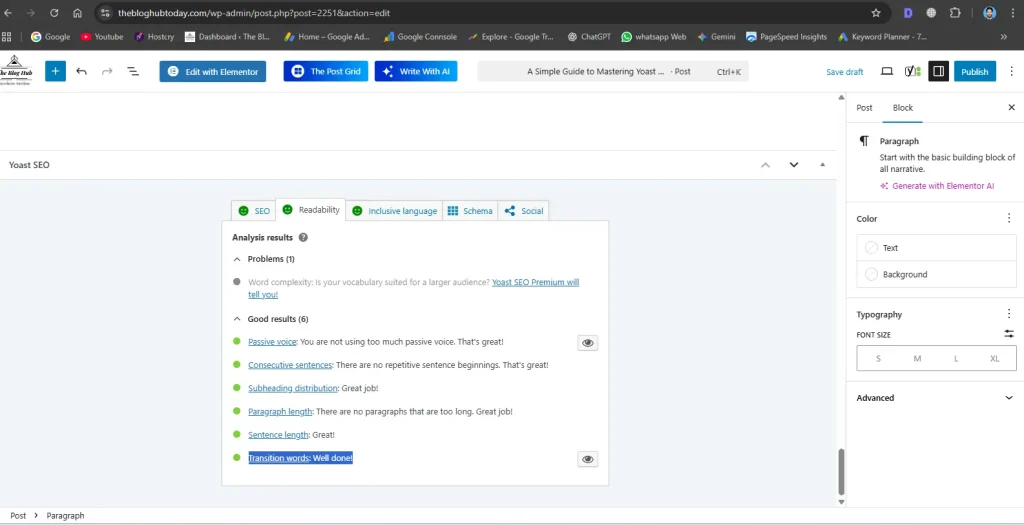
Using Transition Words in Yoast SEO
What Are Transition Words? Transition words connect your ideas together. They act like a bridge between your sentences. Readers need these signals to follow your logic. Without them, your writing feels choppy and robotic. They show the relationship between two separate thoughts. Think of them as the glue for your text. They hold your paragraphs together efficiently.
Why They Matter for SEO Yoast SEO places high value on these words. The plugin wants clear and logical content. Transitions help search engines understand your topic. If a human reads easily, Google likes it too. These words improve the readability score of your post. A good flow keeps visitors reading for longer. This sends a positive signal to search engines.
Common Examples to Use You likely use these words in daily speech. They are simple and effective.
- For adding info: Also, and, as well as.
- For contrast: But, however, although.
- For reasons: Because, since, due to.
- For order: First, next, then, finally. Using a mix of these keeps writing fresh. Do not use the same word every time.
How to Improve Your Score Yoast wants transitions in 30 percent of sentences. This sounds like a high number to beginners. It is often the hardest red light to fix. To fix it, read your text out loud. Listen for abrupt stops between your sentences. Ask how the second sentence relates to the first.
Connecting Your Thoughts If the second sentence explains the first, use “because.” If it adds a new point, use “also.” If it shows a result, use “therefore.” You can add these to the start of sentences. This is the easiest way to boost your score. It makes the text smooth and professional. Your readers will enjoy the effortless flow.
Optimizing Keyphrase Density
What is Keyphrase Density?
Keyphrase density is a simple math score. It counts how often your main word appears. First, you chose a focus keyword for your post. (Need help finding one? Check out 5 Free AI Tools for Keyword Research: The Ultimate Guide for Beginners.) Then, the plugin checks how many times you used it Yoast checks how many times you used it. It compares this number to the total word count. This creates a percentage for your density.
Why Focus on Density?
Search engines need clear signals from your text. They scan your words to understand the topic. Your keyword tells Google what the post is about. If you never use it, Google gets confused. Your post might not show up in search results. You must prove your content matches the user’s search.
Finding the Yoast SEO Balance
You cannot just paste the keyword everywhere. There is a right amount and a wrong amount. Yoast suggests a range between 0.5 and 3 percent. This is the safe zone for your writing. If you use it less, the light stays red. If you use it more, the light turns red. You must find the middle ground.
The Danger of Stuffing
Using the keyword too much is called “keyword stuffing.” This was a common trick many years ago. It does not work anymore. In fact, it hurts your ranking. Google punishes sites that repeat words unnaturally. It makes your article look like spam. Readers hate reading the same word repeatedly. It ruins the reading experience.
Placing Keywords for Yoast SEO
Location matters just as much as frequency. Put your keyword in the very first paragraph. This hooks the reader immediately. Also, use it in your subheadings. Spread the rest evenly throughout the body text. Do not clump them all in one section. Finish by using it once in your conclusion. This creates a strong structure for SEO.
Using Variations
You do not always need the exact match. Google is smart enough to understand similar words. You can use plurals or slight changes. This keeps your writing sounding natural. Write for the human reader first. If a sentence sounds forced, change it. The green light will follow naturally.
Yoast SEO Success: Conclusion
Green Lights Are Not Everything You now know how to fix common errors. Achieving all green lights feels very satisfying. However, do not become obsessed with the score. The green bullet is just a tool. It is not the final judge of quality. Your main goal is helping your reader. Sometimes a red light is okay. If the text reads well, keep it.
Content Quality Comes First Search engines are smarter than any plugin. They look for helpful and unique information. A perfect SEO score cannot save bad content. Focus on solving problems for your audience. Write with passion and clear intent. Good advice will always win over technical tricks. Use Yoast as a guide, not a rulebook.
Practice Makes Perfect Writing for SEO takes time to learn. You might struggle with these rules at first. Do not expect perfection on your first post. You will get faster with every article. Soon, you will write active sentences naturally. Short sentences will become your normal style. The green lights will appear without extra effort.
Publish and Move Forward Do not let the fear of errors stop you. It is better to publish than to wait forever. Get your content out into the world. You can always update the post later. Google likes websites that update their content. Fix what you can and hit the publish button. Your blog grows one post at a time.