

Starting a website is exciting, but ranking new blog posts on Google can feel impossible when you are a beginner. You see expert advice everywhere about complex rules and technical tricks. It often feels like you cannot compete with the big websites.
My site currently has only a few dozen posts. However, I realized quickly that I needed a plan to get traffic. I could not just guess what to write about and hope for the best.
I created a simple, repeatable routine to handle my content. This checklist helps me write focused articles without getting overwhelmed by data. It ensures every post has a fair chance to rank on Google.
Here is the exact process I follow for every single post I publish.
Step 1: Finding Topics for Ranking New Blog Posts
When I first started ranking new blog posts, I made a classic beginner mistake. I simply wrote about whatever popped into my head. The assumption was that if I found it interesting, others would too. Unfortunately, that was a mistake. Countless hours were spent writing posts that nobody ever read because nobody was searching for them.
Now, I never guess. I do a little bit of homework first. I need to prove that people actually want my content before I start typing.
How I find ideas without paying for tools
Since I am new, I don’t have a budget for expensive SEO software. Instead, I use Google itself.
I go to the Google search bar and start typing a question related to my niche. I look at the “predictive text” options that drop down.
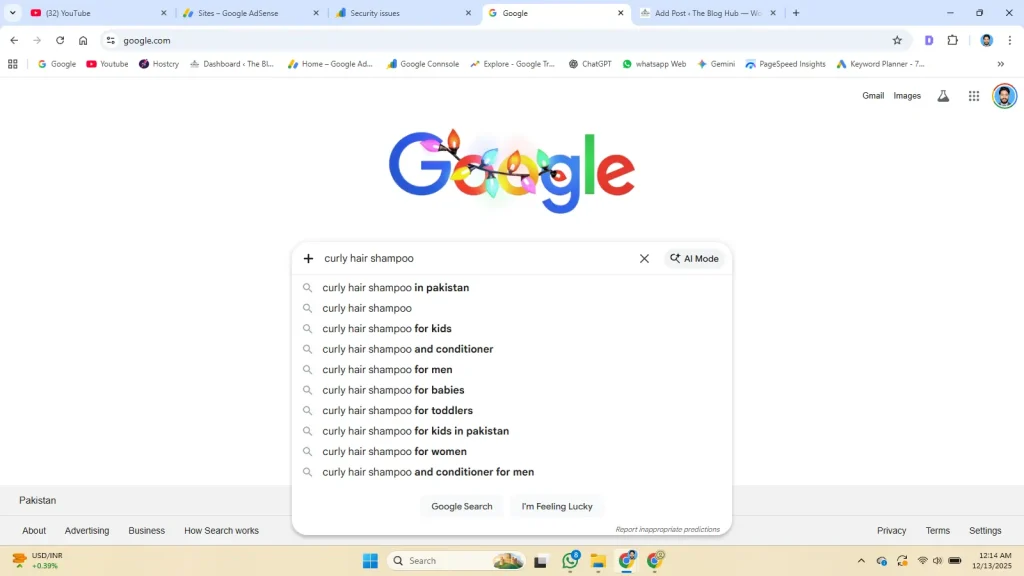
These are real searches that real people are doing right now.
Finding Low Competition Topics for Easy Ranking
I learned quickly that I cannot compete with giant websites yet. If I search for a topic and see results from huge brands or news sites, I walk away.
I look for specific, longer questions—what experts call “long-tail keywords.”
For example, I don’t try to rank for just “Coffee.” That is too hard. Instead, I might write about “How to make cold brew coffee with a mason jar.”
I choose topics where I see other small blogs or forums like Reddit on the first page. That tells me there is room for a new guy like me to rank.
Step 2: Writing Content That Ranks (For Humans First)✍️
Once I have my topic, I do not start obsessing over keywords immediately. My first goal is simply to be helpful. I try to write the article exactly as if I were explaining it to a friend sitting across the table.
If my title promises a solution, I try to give that solution in the very first paragraph. I hate visiting blogs that make me scroll past 500 words of fluff just to get to the point.
Making it easy on the eyes
I have learned that big blocks of text scare readers away on the internet.
Breaking everything down is essential. Lots of headings (like the one above) allow people to skim the content easily. Paragraphs are kept very short—sometimes just two or three sentences. This makes the article feel less like a textbook and more like a conversation.
Using Custom Images to Boost Blog Ranking
Since I don’t use paid tools, I don’t have access to expensive stock photo libraries. Honestly, I think that is a good thing.
I realized that generic photos of “business people shaking hands” look fake. They don’t build trust.
Instead, I use my own photos. If I am writing a how-to guide, I grab my phone and take a real picture of the process. It might not be professional quality, but it is real.
Using my own images proves to the reader that I actually did what I am writing about. It shows that I am a real person having a real experience, not just someone copying information from other sites. That authenticity is my advantage.
Step 3: Technical Tweaks for Ranking New Blog Posts
I am not a web developer. Looking at code makes my head spin. However, I have learned that I cannot just hit “publish” the moment I finish writing.
I spend about ten minutes doing a few technical cleanups that are essential for ranking new blog posts.
I write the “Search Snippet” myself
When you search on Google, you see a blue title and a short description below it. I treat this like a free ad for my article.
I do not let my website generate this automatically because a good description helps with ranking new blog posts. Instead, writing it manually works much better. The main question to ask is, ‘What would make me click this?’ The focus keyphrase should be in the title, while the description must promise a clear answer.
I shrink my heavy photos
Since I use my own photos from my phone, the files are usually huge. I learned the hard way that big files make my website load very slowly.
Before I upload any image, I make the file size smaller. I use free websites to compress the image data. It only takes a few seconds, but it keeps my site fast. A fast site is a happy site for Google.
Internal Linking to Help Rank New Posts
I currently have about 13 posts on my site. Before I finish, I check if I can link to any of them. For example, while this post focuses on new content, I also link to my guide on The Content Refresh Strategy: How to Grow Traffic Without New Articles so readers know how to handle their older posts too.
If I am writing about “morning routines” and I previously wrote about “waking up early,” I create a link between them. This helps readers stay on my site longer. It also helps Google find my older posts again.
Step 4: Actions to Start Ranking After Publishing
Clicking “publish” is a great feeling, but my job is not quite done yet. I used to just close my laptop and hope for the best. Now, I take two specific actions to help my new post survive.
Telling Google to Index and Rank My Post
I do not wait for Google to find me by accident. I use a free tool called Google Search Console. It might sound technical, but it is actually very simple to use.
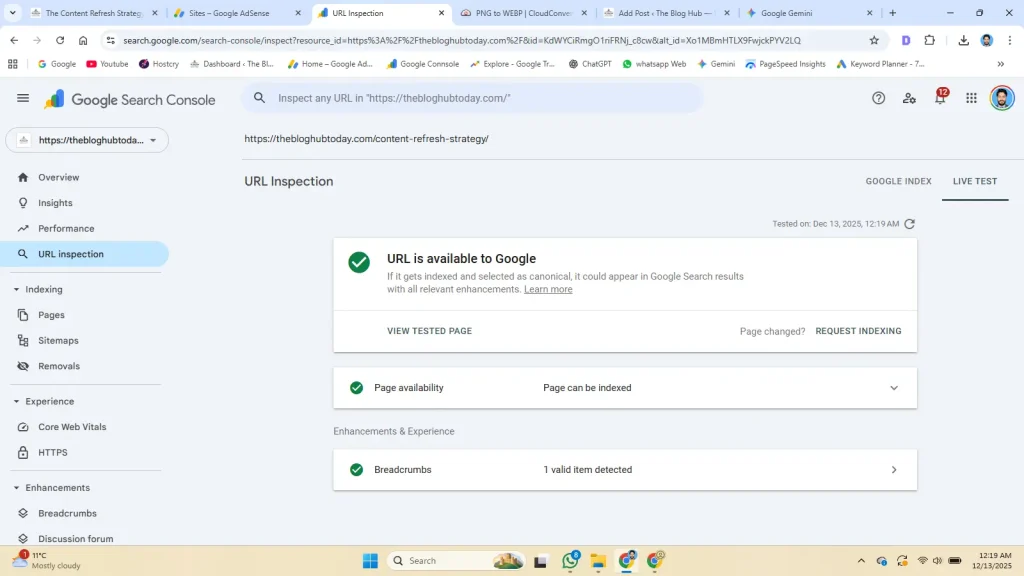
First, the link of the new article gets pasted into the ‘URL Inspection’ tool. Then, clicking ‘Request Indexing’ is basically me raising my hand and telling Google, ‘Hey, I just wrote something new. Please look at it.
Sharing With Humans to Signal Ranking Worthiness
I do not have a massive email list yet. However, I still share my link.
I post the article on my social media accounts. I might share it in a relevant group or forum if it is actually helpful. Even getting ten or twenty visitors on the first day helps. It shows search engines that real people are interested in what I have to say.
Conclusion: Trusting the Routine
That is it. The strategy for ranking new blog posts doesn’t have to be complicated.
Since I started following this process for my 13 posts, I feel much less stressed. I am not just guessing anymore. I know that every article I write has a real purpose and a fair chance to rank.
If you are a new blogger like me, don’t let the experts scare you. You don’t need to know everything about algorithms right now.
Just focus on being helpful. Answer questions clearly. Use your own voice and your own images. If you stay consistent with this simple routine, the traffic will eventually follow.
Frequently Asked Questions
Do I really need expensive tools to rank? No. I built my site using only free methods. Google Search and common sense work just fine for beginners.
How long does it take to see results? It takes patience. New blogs often wait three to six months for real traffic. Just keep writing helpful content.
Can I use AI to write my posts? You can use it for ideas, but do not copy-paste. Google prefers human stories. Always rewrite it in your own voice.
How many posts should I publish a week? Focus on quality, not speed. I try to publish one really good article rather than three rushed ones.
What if I don’t have good photos? Use what you have. A real photo from your phone builds more trust than a perfect stock image.
товары для праздника и подарков магазин One Price [url=https://www.oneprice.shop]https://oneprice.shop/[/url]
http://google.co.uz/url?q=http://oneprice.shop